Of course it could also happen that you don’t have any friends with a (custom firmware) PSP, nor a spare battery. Instead of buying a brand new battery to cut open, you can always spend less money for more certainty.
Available on eBay and Amazon are ‘Tool’ batteries, from Datel. These are batteries that are already modified! (i.e. you’ll only need a Magic Memory Stick).
If you have one in your possession, use the below steps to make yourself a Magic Memory Stick
If you don’t have a CFW PSP you can use to mod your batteries, you probably won’t have a PSP to make you a Magic Memory Stick either.
Luckily, it’s also possible to do this directly through your PC, using Rain’s Simple MMS Maker (available for Windows Xp & Vista). Download it here.
You’re also going to need a 1.50 and 3.80 eboot file, which can be downloaded respectively here and here. 
To use the program, just select DCv4 from the dropdown list and locate the 3.80 eboot file. Also check the Formatting checkbox and choose to add the 1.50 Kernel addon if you have a fat PSP.
Now, to make your MMS, just press the big button at the lower right.
Find out how to use your Pandora Battery Below.
Make sure you have your Magic Memory Stick inserted and put in your battery, a black and white menu should pop-up. Then, go to recover and choose to install the 3.80 Custom Firmware (M33).
Just wait for it to finish (grab some coffee, this can take a while), and you’re done. You are now running a 3.80 M33 Custom Firmware!

Upgrade to the latest Custom Firmware
As you might have noticed, you’re on CFW 3.80 M33 now; that isn’t very high up the ladder, considering CFW 5.00 M33-3 is already available (or even higher, by the time you read this). Follow the steps below to upgrade to the latest custom firmware.
Files you need:
- The latest M33 Firmware version (5.00-3 at the time of writing - mirror)
- The parallel official fimware (5.00 in this case - mirror)
a) File placement
Extract the downloaded archives.
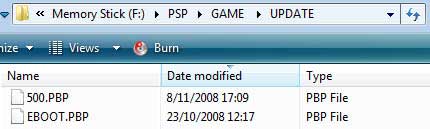
Move the unRARred UPDATE folder to X:\PSP\GAME\UPDATE (with X: being your PSP). Also add the parallel official firmware to that folder, renamed in the same manner as in 2.a
b) Updating
Go to Game -> Memory Stick™ and open the installation file. After verifying the eboot, it’ll ask you for confirmation. Press X to continue.
Follow the on-screen instructions to update. The update will take five minutes or less.
Congratulations, you are now on the latest M33 custom firmware! For now this is the end of this guide. However, as soon as a working exploit appears for the PSP-3000, you can expect us to cover it!
|
 Free Download DVD Ripper
  ALL-IN-ONE Converter